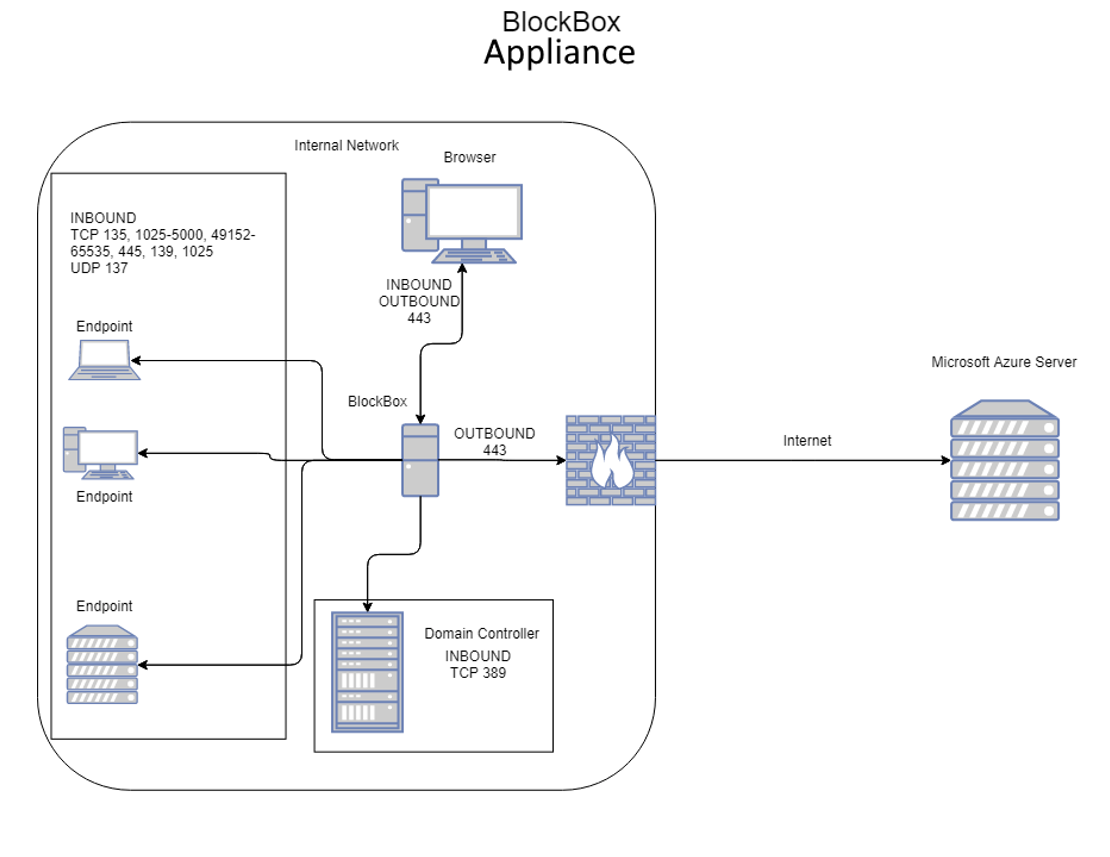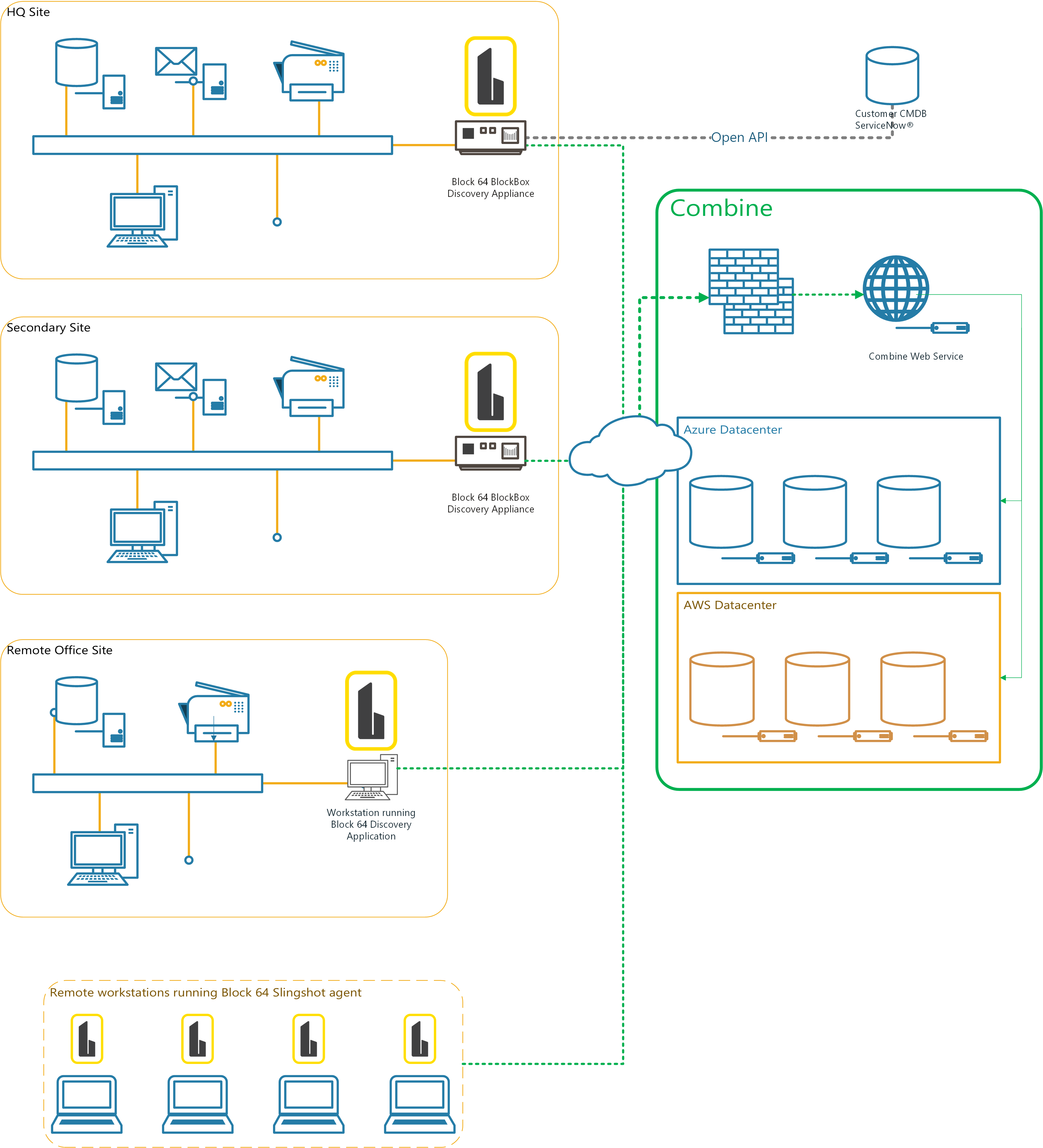
This article describes all technical pre-work and prerequisites required before deploying the BlockBox Virtual Appliance.
Completing this pre-work is essential to ensure a successful deployment and accurate discovery.
1. What Is the BlockBox Virtual Appliance?
The BlockBox Virtual Appliance is a hardened Linux-based virtual appliance with an onboard web interface.
It is designed to provide a comprehensive, accurate, and low-impact view of your IT environment by performing agentless discovery and inventory.
BlockBox can be deployed as:
-
A standalone virtual appliance on a supported hypervisor
The appliance is built to discover and inventory:
-
Windows PCs and servers
-
Linux, Unix, and Solaris systems
-
macOS devices
-
SNMP-enabled Layer 2 and Layer 3 devices
-
Virtual infrastructure (VMware, Nutanix)
-
Selected cloud and hybrid environments
2. How BlockBox Collects Data
BlockBox uses a multi-stage, low-impact discovery process:
-
Scanning
-
Low-impact TCP SYN scanning across defined subnets
-
Identifies live devices without disrupting network operations
-
-
OS Fingerprinting (Optional)
-
Uses lightweight TCP and UDP probes
-
Helps identify device type and operating system early
-
Recommended for most environments except very fragile networks
-
-
Inventory Collection
-
Once a device is validated, BlockBox collects inventory data based on device type
-
This staged approach minimizes network impact while maximizing accuracy.
3. Data Collected by BlockBox
BlockBox collects technical inventory data only. It does not access personal files, emails, or user-generated content. The performance data the appliance gathers feeds the utilization figures in Insights' Cloud Sizing reports. See Utilization Collection with On-Prem Collectors
Network Data
-
IP addresses
-
Network presence across scoped subnets
Hardware Data
-
Manufacturer and model
-
CPU, RAM, and hardware characteristics
Software Data
-
Installed applications
-
System components
-
Database instances where applicable
Active Directory Data
-
User and device objects
-
Directory structure
-
Used for analytics and discovery validation
Virtual Infrastructure
-
Hosts, guests, and management relationships
-
Relevant for cloud readiness and optimization
Usage & Performance (where supported)
-
Resource utilization
-
Activity indicators used for sizing and optimization
4. Data Access, Privacy, and Retention
During an engagement:
-
BlockBox data may be accessed by Block 64 and/or authorized partners for analysis and support
-
Data is retained for a limited period and destroyed after engagement completion
-
Strict security and privacy controls are followed
Detailed information is available in the Security FAQ and Privacy Policy on the Block 64 website.
5. Platform & Resource Requirements
Virtual Appliance Recommended Resources
-
CPU: Minimum 4 vCPUs
-
Memory: Minimum 8 GB RAM
-
Disk: Minimum 40 GB storage (thin provisioning supported)
Supported Platforms
-
VMware ESXi 6.5 or later
-
Microsoft Hyper-V 2016 or later
-
Microsoft Azure
-
Nutanix
6. Network Readiness & Placement
Network Location
-
The appliance must be placed on a network segment that can route to all networks in scope
-
ACLs on routers, switches, or firewalls must allow communication to endpoints
Subnets in Scope
You must provide:
-
All internal subnets to be scanned
-
CIDR notation or individual IP ranges are supported
It is highly recommended to avoid using large subnets unless they are strictly required. Maximum ( /16 )
7. Network Ports Used by BlockBox
BlockBox uses standard ports that are rarely blocked in enterprise environments.
Windows Inventory
-
TCP 135, 139, 445 (WMI, RPC, SMB)
-
TCP 5985, 5986 (WinRM)
-
UDP 137, 138 (NetBIOS)
-
TCP dynamic RPC ranges (1025–5000, 49152–65535)
Active Directory
-
TCP 389 (LDAP)
-
TCP 636 (LDAPS)
Linux, Unix, macOS
-
TCP 22 (SSH)
SNMP Devices
-
UDP 161, 162
Virtual Infrastructure
-
TCP 443 (vCenter, Nutanix, HTTPS)
Oracle DB Inventory:
- 1521 (Oracle DB Connection)
External Services
-
TCP 80 and 443
-
Destination URLs:
-
combine.block64.com -
sublimation.block64.com
-
Important: Endpoints must allow inbound connectivity from the BlockBox appliance only.
8. Security, Firewalls & Endpoint Protection
BlockBox is designed to be agentless, which requires remote administrative access.
Required Security Pre-Work
-
Network firewalls and IPS systems must allow traffic from the appliance
- Local endpoint firewalls and security software must allow communication
Best practice:
Whitelist the appliance IP address across all endpoints and ports.
Guides are available for:
9. Credential Requirements by Platform
Windows Inventory
-
Domain or limited service account
-
Access to:
-
WMI (read-only) - (Polling CPU, RAM Usage & Disk IOPS)
-
RPC / Remote Registry - (Collection of Software/Hardware data)
-
SMB (ADMIN$) - (Example: \\10.0.0.50\c$\... or \\192.168.2.5\ADMIN$\...)
-
-
Administrative credentials are recommended but not strictly required if protocols are accessible
Linux / Unix / Solaris
Supported:
-
Most RPM-based and Debian-based Linux
-
Oracle Solaris
-
IBM AIX (limited metrics)
Not supported:
-
IBM i (AS/400)
-
HP-UX
-
Gentoo, Slackware, Alpine, Pacman-based Linux
Required access:
-
SSH (TCP 22) - (OSX + POSIX-Compliant Inventory + CLI access)
- Credentials that can access the following resources for *nix systems:
/procfilesystemdmidecode(preferred)- Superuser access improves accuracy
- Credentials that can access the following resources for Solaris systems:
/usr/sbin/psrinfo/usr/sbin/prtconf/usr/sbin/smbios(or eeprom or sneep)
macOS
-
Administrator or root credentials
- SSH management must be enabled on the endpoint
VMware & Nutanix
-
Read-only credentials at vCenter or cluster level
-
Optional permission for license visibility if required
SNMP
-
SNMP v1/v2c read-only community strings
-
Or SNMP v3 credentials (username, auth, encryption details)
10. Data Collection Workflow
Scanning
-
Low-impact TCP SYN scanning
-
Builds a list of reachable targets
Fingerprinting (Optional)
-
OS and device identification
-
Reduces unnecessary full inventory attempts
Inventory Collection
-
Windows & macOS: hardware, software, serials
-
Linux/Unix: packages, hardware, system files
-
SNMP devices: full MIB data
-
Virtual infrastructure: host/guest relationships
11. Pre-Work Validation Checklist
Before proceeding to deployment, confirm:
-
✅ Appliance resources allocated
-
✅ Subnets defined
-
✅ Required ports open
-
✅ Credentials validated
-
✅ Security tools configured
-
✅ Endpoint communication allowed
This Technical Pre-Work & Prerequisites article is the authoritative reference for preparing an environment for BlockBox.
Completing this pre-work:
-
Prevents discovery gaps
-
Reduces troubleshooting
-
Ensures accurate and reliable inventory
Once all steps are verified, proceed with the BlockBox Virtual Appliance Deployment Guide.
Example Network Diagrams