
If the Discovery Agent is installed but devices are not appearing in inventory or data is not updating as expected, the following steps can help identify and resolve the most common issues.
1. Verify the Enrollment Token
-
Ensure the correct Enrollment Token was used during installation.
-
The Enrollment Token is unique to each customer and is used to associate the agent with the correct Block 64 tenant.
-
Using an incorrect or expired token will prevent the agent from registering and reporting data.
Tip: If the token was copied manually, re-copy it from the Insights portal to avoid typos. You will need to re-install the agent to enter the new Token.
2. Check Antivirus and Security Software
-
The Discovery Agent is installed using a .msi installer.
-
Confirm that antivirus or endpoint security software has not blocked, quarantined, or removed the agent after installation.
-
Add an exclusion for the Discovery Agent installation to prevent future interruptions.
If the agent is removed by security software, it will stop reporting inventory data.
3. Review Agent Logs
Logs can help identify failures during installation or inventory collection.
-
Log Path: C:\Windows\Temp\Block64
-
Review the log files for:
-
Installation errors
-
Enrollment or connectivity issues
-
Inventory or data collection failures
-
Providing these logs to support can significantly speed up troubleshooting.
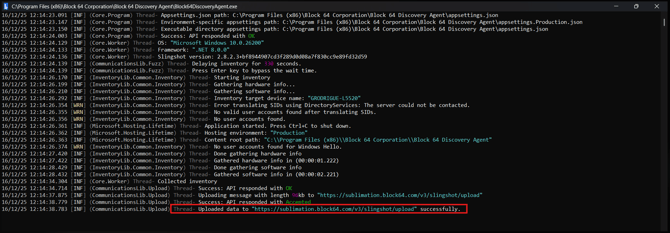
A successful log entry should look like the example below and end with a “Data uploaded successfully” message:

4. When to Contact Support
If the issue persists after completing the steps above, please open a support ticket and include:
-
Confirmation that the correct Enrollment Token was used
-
Whether antivirus or security software is present
-
Relevant log files from the path above
By following these steps, most Discovery Agent issues can be identified and resolved quickly, ensuring devices report correctly into Block 64.