
Overview
The Notion connection in Block 64 enables secure, read-only access to workspace member data from your organization's Notion workspace. Notion is an all-in-one workspace for notes, docs, and project management.
This integration collects data about your organization's Notion workspace, including active members and workspace access, providing visibility into Notion adoption and seat utilization across the organization. Once connected, the data collected from this integration appears in the following Block 64 Insights reports:
-
Reports → IT Asset Management → SaaS → Usage – Displays total and active Notion users, along with a per-product breakdown showing product name, category, and active user counts. Results can be exported to CSV.
-
Reports → IT Asset Management → SaaS → Licensing – Displays the estimated cost of licenses, unassigned cost, and recoverable cost for your Notion subscription, along with assigned, unassigned, and recoverable quantities. Entitled quantities can be added manually to compare purchased seats against actual assignment. Results can be exported to CSV.
The Credentials Needed for This Integration
To set up this integration, you'll need:
-
Notion Internal Integration Token (required) – An internal integration token created by a Notion workspace owner, with read access to user information. Business accounts only need this token.
-
SCIM Token (optional – Enterprise plans only) – A SCIM Bearer token generated in Notion under Settings → Identity & Provisioning → SCIM. If provided, this enables inactive user detection and last-activity tracking.
Create a Notion Internal Integration Token
- Sign in to Notion as a workspace owner.
- Go to notion.so/profile/integrations (Profile → Integrations, also reachable via Settings → Connections → Develop or manage integrations).
- Click New integration.
- Give the integration a recognizable name (for example, Block 64 Integration) and select your organization's workspace.
- Under the integration's capabilities, grant read access to user information (no content capabilities are required, Block 64 does not read page or database content).
- Save the integration and copy the Internal Integration Token (secret). Store it securely.
Note: Internal integrations are scoped to a single workspace and inherit only the capabilities you grant. If your organization uses multiple Notion workspaces, create the integration in the workspace you want Block 64 to report on.
Generate a SCIM Token (Enterprise only – optional)
To enable inactive user detection and last-activity tracking:
- Sign in to Notion as a workspace owner on an Enterprise plan.
- Go to Settings → Identity & Provisioning → SCIM.
- Generate a new SCIM token (Bearer token) and copy it.
If your organization is not on a Notion Enterprise plan, skip this step, the integration works with the Internal Integration Token alone.
How to Add This Integration
- In the Block 64 Insights portal, navigate to Integrations → Notion.
- In the API Key field, paste the Notion Internal Integration Token.
- (Optional – Enterprise only) In the SCIM Token field, paste the SCIM Bearer token generated in Notion.
- Ensure the Integration Connection toggle is set to Enabled.
- Click Connect to finalize setup.
Once connected, the integration status will show Data Collection Scheduled until the first sync completes, after which Notion workspace and member data will begin appearing in your Insights reports.
Tip: The Integration Connection toggle lets you enable or disable data collection at any time without deleting your integration credentials.
Why Is This Integration Failing?
If the integration isn't working, it's usually caused by:
- Invalid Internal Integration Token – The token entered may be incorrect, or the integration may have been deleted or its secret regenerated in Notion without being updated in Block 64.
- Missing user-information capability – The integration was created without read access to user information, so member data cannot be collected.
- Wrong workspace – The integration was created in a different Notion workspace than the one you intend to report on.
- Invalid or expired SCIM Token – The SCIM Bearer token may have been regenerated or revoked in Notion.
- SCIM not available on your plan – A SCIM Token was entered, but the Notion workspace is not on an Enterprise plan.
- Integration disabled – The Integration Connection toggle is set to Disabled, pausing data collection.
To fix this:
- In Notion, verify the integration still exists under your profile's Integrations page and that its capabilities include read access to user information.
- If the token was regenerated, update it in Block 64 and click Connect again.
- Confirm the integration belongs to the correct workspace.
- For Enterprise accounts, verify the SCIM token under Settings → Identity & Provisioning → SCIM and regenerate it if needed.
- Verify that the Integration Connection toggle is set to Enabled in the Block 64 Insights portal.
How to Remove This Integration
From Block 64:
You can disable this integration temporarily by clicking on the Enable switch in the integration. This pauses data collection without deleting your integration credentials.
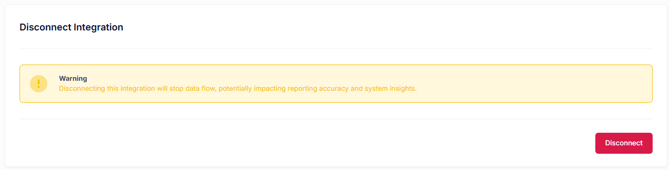
Alternatively, you can disconnect the integration entirely by clicking on the Disconnect button.

To permanently remove all collected data, click Delete Data under Delete Integration Data.
⚠️ This cannot be undone — all collected data for this integration will be permanently removed, and the integration will be disconnected.
From Notion:
- Sign in to Notion as a workspace owner.
- Go to your profile's Integrations page (notion.so/profile/integrations).
- Locate the integration created for Block 64 and delete it (or regenerate its secret to invalidate the token in use).
- (Enterprise only) Under Settings → Identity & Provisioning → SCIM, revoke the SCIM token created for Block 64.
Security & Privacy
All access is read-only. Block 64 cannot create, modify, or delete any content, members, or settings in your Notion workspace.
Only metadata relating to workspace members and workspace access is collected, pages, databases, documents, and their contents are never read or stored. The integration requires only the user-information read capability; no content capabilities are requested.
Data is handled in compliance with Block 64's Privacy Policy and Notion's Terms of Service.
Access can be reviewed or revoked at any time by removing the internal integration (and revoking the SCIM token, if configured) in Notion.