
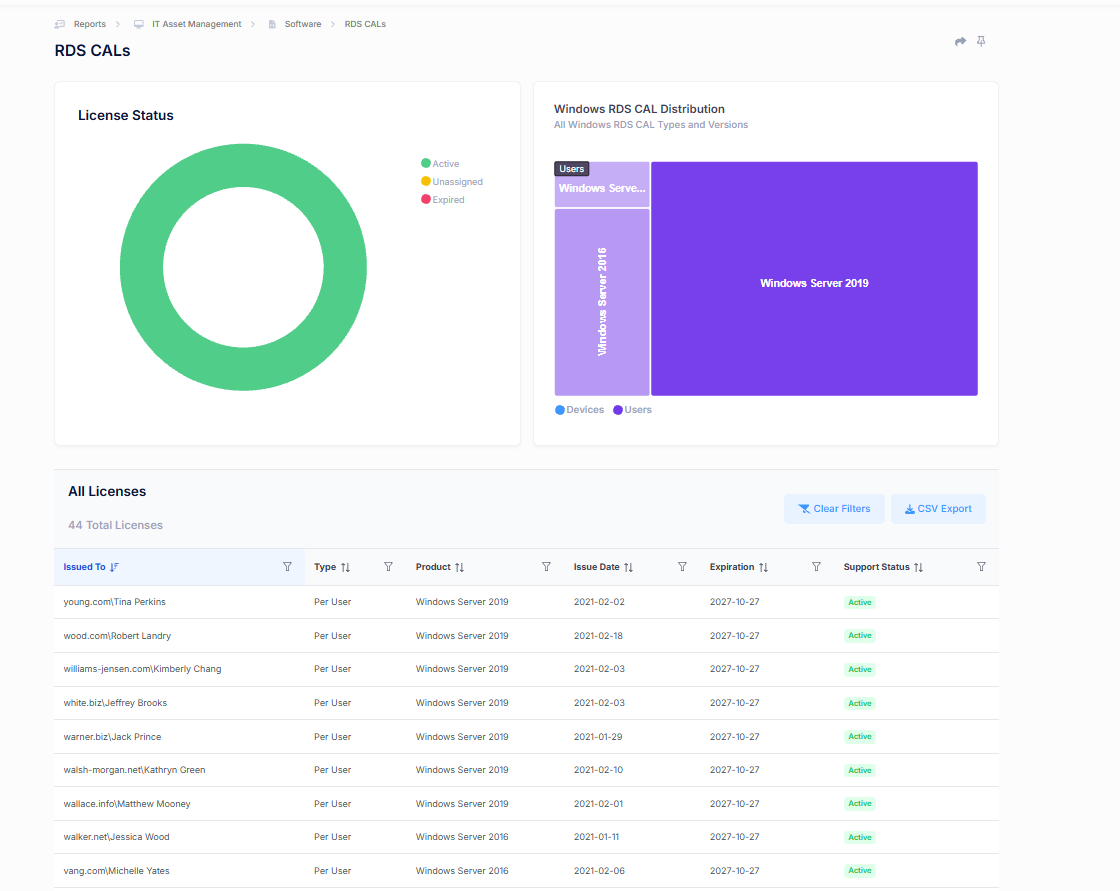
The RDS CALs (Remote Desktop Services Client Access Licenses) report provides visibility into Remote Desktop Services licensing across your environment. This report helps administrators monitor RDS CAL allocation, track license status, identify expiring licenses, and maintain compliance with Microsoft Remote Desktop Services licensing requirements.
License Status
Provides a summary of all discovered RDS CALs based on their current status.
License statuses may include:
- Active – Licenses currently assigned and available for use.
- Unassigned – Licenses that have been issued but are not currently associated with a user or device.
- Expired – Licenses that have reached their expiration date and may require renewal or replacement.
This visualization enables administrators to quickly assess the overall health of their RDS licensing environment and identify licensing issues that require attention.
Windows RDS CAL Distribution
Displays the distribution of Remote Desktop Services licenses across Windows Server versions and licensing types.
The visualization helps organizations understand:
- Which Windows Server versions are consuming the most RDS CALs.
- The balance between User CALs and Device CALs.
- Potential migration or upgrade considerations for legacy server versions.
This provides a high-level overview of how RDS licensing is being utilized across the environment.
All Licenses
The All Licenses table provides a detailed inventory of assigned RDS CALs discovered within the environment.
Key Metrics
Issued To
Identifies the user or device currently assigned the RDS CAL.
Type
Displays the licensing model assigned to the CAL, such as User CAL or Device CAL.
Product
The Windows Server version associated with the RDS CAL.
Issue Date
The date the license was originally issued.
Expiration
The date the license is scheduled to expire.
Support Status
Displays the current status of the license, such as Active, Unassigned, or Expired.
Filtering and Analysis
Users can filter and sort licensing data to locate specific users, devices, server versions, or license statuses.
The CSV Export option allows administrators to export detailed RDS CAL information for reporting, compliance reviews, audit preparation, and licensing reconciliation activities.
Key Benefits
The RDS CALs report enables organizations to:
- Maintain visibility into Remote Desktop Services licensing.
- Track assigned and available CALs.
- Monitor license expiration dates.
- Identify unused or unassigned licenses.
- Support Microsoft licensing compliance efforts.
- Prepare for licensing audits and renewal planning.
By centralizing RDS CAL inventory and assignment data, this report provides a single view for managing and maintaining compliance with Remote Desktop Services licensing requirements across the organization.