
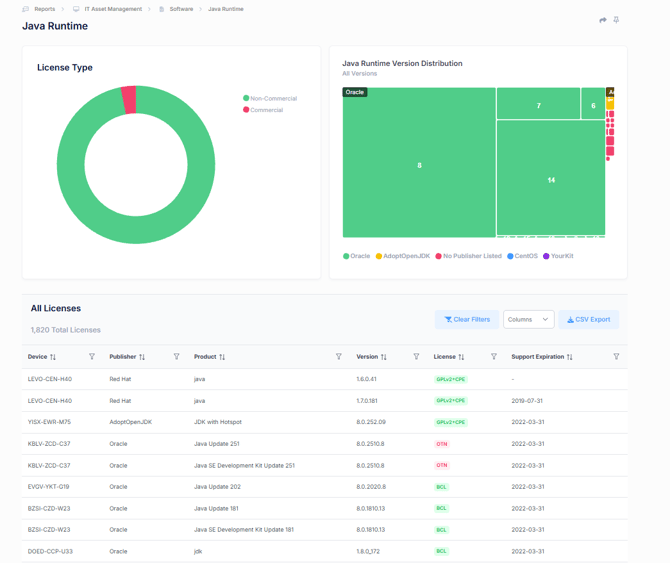
The Java Runtime report provides visibility into Java installations across your environment, helping organizations identify Java versions, licensing models, publishers, and support status. This report is particularly useful for managing Oracle Java licensing exposure, tracking unsupported Java installations, and identifying opportunities to standardize on approved Java distributions.
License Type
Provides a breakdown of Java installations by licensing classification.
- Commercial – Java installations that may require paid licensing or commercial support agreements.
- Non-Commercial – Open-source or freely licensed Java distributions that do not typically require commercial licensing.
This view helps organizations quickly assess potential licensing risk and understand the overall composition of their Java estate.
Java Runtime Version Distribution
Displays Java installations grouped by publisher and version.
The visualization helps identify:
- The most widely deployed Java versions.
- Distribution of Java runtimes across publishers.
- Legacy Java versions that may require upgrades.
- Opportunities to standardize on supported Java platforms.
Publishers may include distributions such as Oracle Java, Eclipse Adoptium, Red Hat and other Java providers discovered within the environment.
This view enables administrators to quickly identify version sprawl and prioritize Java modernization efforts.
The All Licenses table provides a detailed inventory of Java installations discovered throughout the environment.
Key Metrics
Device
The endpoint, server, or system where the Java installation was detected.
Publisher
The organization responsible for distributing the Java runtime.
Product
The specific Java product or runtime identified.
Version
The installed Java version.
License
The licensing model associated with the installation.
Examples may include:
- GPLv2 + CPE
- Oracle Binary Code License (BCL)
- Oracle Technology Network (OTN)
- Other vendor-specific licensing models
Support Expiration
Displays the end of support date, where applicable, for the identified Java version or support agreement.This information helps organizations identify unsupported or end-of-life Java installations that may require remediation.
Users can filter and sort Java inventory data to identify specific versions, publishers, devices, or licensing models.
Exporting Data
The CSV Export option allows administrators to export Java inventory and licensing information for further analysis, compliance reviews, audit preparation, and software asset management reporting.
Key Benefits
The Java Runtime report enables organizations to:
- Gain visibility into all Java installations across the environment.
- Identify potential Oracle Java licensing exposure.
- Track commercial versus non-commercial Java distributions.
- Monitor Java version adoption and standardization efforts.
- Detect unsupported and end-of-life Java versions.
- Support software compliance and audit readiness initiatives.
- Reduce licensing costs through informed Java platform decisions.
By centralizing Java inventory, licensing, and version information, this report helps organizations maintain compliance, reduce risk, and effectively manage their Java estate.